
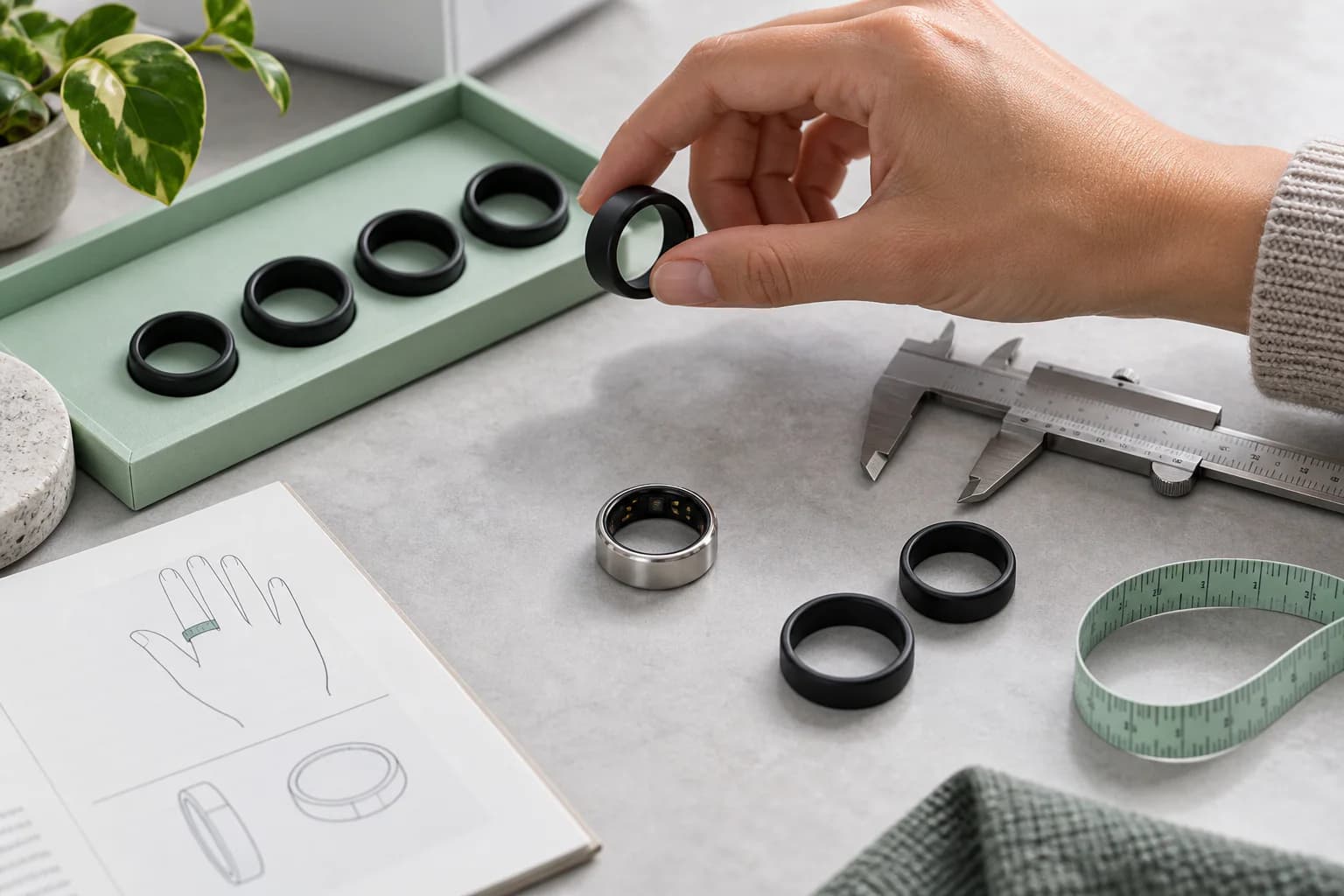
Choosing a smart ring size is not the same as buying ordinary jewelry. A smart ring has sensors on its inner surface, needs stable skin contact and is usually wider than a thin fashion ring. Your familiar jewelry size may therefore be wrong—even when the same number appears on the box.
The most reliable method is simple: use the official sizing kit for the exact EnergyMo model you plan to buy, test the intended finger on both hands, and wear the sizer for at least 24 hours, including sleep.
The correct size should feel snug, stable and easy to forget. It should not spin freely or show a large gap when you make a fist. It should also never cause pain, throbbing, tingling, numbness, color change or worsening swelling.
This guide explains the full process—from choosing a finger to confirming the size after a night of sleep.
Why Smart Ring Sizing Is Different From Regular Ring Sizing
A standard jewelry ring mainly needs to stay on your finger and feel comfortable. A smart ring must also keep optical and temperature sensors in a useful position.
Three design differences affect fit:
- Internal sensors take up space. Raised or recessed sensor structures can change the effective inner shape.
- The band is often wider. A wide ring can feel tighter than a narrow ring with a similar internal diameter.
- Different brands and generations use different sizing systems. A size from one product may not match another brand—or even another generation from the same brand.
Official guidance reflects this. Samsung warns that a person’s regular ring size may not be the best Galaxy Ring size because of its sensors. Oura says its whole sizes differ slightly from standard US sizing and instructs users to select the correct generation-specific sizing kit. RingConn also states that its smart-ring sizes differ from regular rings.
The lesson is clear: do not convert your wedding-ring size directly into a smart-ring order unless the manufacturer explicitly supports that conversion for the exact model.
The Best Way to Measure Smart Ring Size
Use the official sizing kit whenever it is available.
A sizing kit lets you test:
- the actual internal shape of the product;
- the position and space required by sensors;
- the width of the band;
- comfort across normal daily swelling;
- whether the ring can pass the knuckle;
- whether it stays stable during sleep and movement.
A tape measure or printable chart captures only one moment and one dimension. A sizer shows how the ring behaves in real life.
Before using any kit, confirm that it belongs to the correct EnergyMo model or generation. Do not assume that a previous model’s samples are interchangeable with a new one.
Step-by-Step Smart Ring Sizing Method
Step 1: Decide what you want the ring to track
Your main use can influence the best finger.
If sleep, recovery, resting heart rate and HRV are priorities, choose a finger that stays comfortable overnight and gives stable sensor contact. If you frequently lift weights, use tools or grip equipment, also consider whether the ring will need to be removed during those activities.
Step 2: Choose two or three candidate fingers
Start with the index, middle and ring fingers. These are commonly recommended positions for health-focused smart rings.
Avoid deciding based on appearance alone. Consider:
- comfort at the base of the finger;
- difference between the knuckle and finger base;
- contact with neighboring fingers;
- dominant-hand activity;
- whether the ring rotates during normal movement.
If the knuckle is much wider than the finger base, a ring that passes the knuckle may sit too loosely below it. Another finger may provide a better balance.
Step 3: Test both hands
The same finger is not necessarily the same size on both hands. Dominant-hand use, anatomy, swelling and previous injury can create small but important differences.
Try the same sizer on both index fingers, both middle fingers and any ring finger you are considering. Do not order for the right hand simply because that is where you normally wear jewelry.
Step 4: Start with the size that feels secure—not compressed
Place the sizer at the base of the finger. It should maintain contact without squeezing.
A promising size should:
- stay in position during ordinary movement;
- resist casual spinning;
- move over the knuckle with gentle resistance;
- allow you to make a fist comfortably;
- come off intentionally without force.
Do not choose a size only because it produces the tightest contact. More pressure does not automatically create more accurate data.
Step 5: Check sensor orientation
If the model has a defined sensor side or orientation mark, position it according to the EnergyMo instructions. Sizing with the ring rotated can create a false impression of fit and may not reproduce the intended sensor contact.
On many smart rings, the sensor area should sit against the palm side of the finger. Follow the exact product guide rather than a generic diagram.
Step 6: Perform the knuckle test
Remove and replace the sizer several times.
The ring should pass the knuckle with mild resistance. If it slides off without any resistance, it may be too loose. If it requires force, causes pain or becomes difficult to remove, it may be too small.
The knuckle test is especially important for fingers with a wide joint and a narrow base.
Step 7: Perform the fist test
Make a relaxed fist and look at the top of the finger.
- A large visible gap may indicate a loose fit.
- Pinching, pain or restricted bending may indicate a tight fit.
- A small temporary skin impression can occur with a snug ring, but it should not be deep, painful or persistent.
Repeat the test after several hours, not only when you first put the sizer on.
Step 8: Wear the sizer for at least 24 hours
This is the step most buyers skip—and the one official guides repeatedly emphasize.
Wear the same sizer through:
- a normal workday;
- walking and routine activity;
- handwashing and complete drying;
- a meal and normal hydration;
- warm and cool parts of the day;
- sleep;
- the following morning.
Oura recommends a full day including sleep. Samsung recommends more than 24 hours including sleep. RingConn similarly recommends at least 24 hours because fingers expand and shrink through the day.
Step 9: Compare the next size when uncertain
If you are deciding between two sizes, do not rely on memory. Wear each candidate under similar conditions.
Compare:
- overnight comfort;
- morning tightness;
- rotation during activity;
- gap during the fist test;
- knuckle resistance;
- whether the sensors remain in place;
- how easily the sizer can be removed.
The better size is the one that preserves stable contact across the day without pressure symptoms.
Step 10: Confirm the exact size and intended finger
Write down:
- product model;
- sizing-kit generation;
- selected size;
- preferred hand;
- preferred finger;
- one backup finger where the same size fits safely.
This prevents mistakes when you return to the order page and gives you an alternative if temperature or temporary swelling changes the fit.
How Should a Smart Ring Fit?
The simplest description is snug, not tight.
A correct fit usually feels like this
- The ring touches the skin consistently.
- It does not spin freely during ordinary movement.
- The sensor position remains stable.
- It passes the knuckle with gentle resistance.
- You can bend the finger and make a fist comfortably.
- It remains comfortable during sleep.
- It can be removed intentionally without pain or force.
A ring may be too loose if
- it rotates repeatedly without effort;
- the sensor side moves away from its intended position;
- a gap appears when making a fist;
- it can slip over the knuckle too easily;
- it feels at risk of coming off during washing;
- app data shows unexplained gaps after confirming battery and sync.
A ring may be too tight if
- it causes pain, throbbing or pressure;
- the finger tingles or feels numb;
- the finger becomes cold or changes color;
- swelling increases around the ring;
- bending the finger is uncomfortable;
- it leaves a deep, painful or persistent indentation;
- removal requires force.
If you develop pain, numbness, tingling, discoloration or worsening swelling, remove the ring when it is safe to do so. If it cannot be removed safely or circulation appears affected, seek appropriate medical help rather than repeatedly forcing it.
Why Finger Size Changes During the Day
Your finger is not a fixed cylinder. Its size changes with circulation, tissue fluid and environmental conditions.
Common influences include:
- temperature;
- exercise;
- hydration;
- sodium and meals;
- time of day;
- sleep;
- travel;
- hormonal changes;
- illness, inflammation or injury;
- repetitive hand use.
Cold can make a ring feel loose. Heat and activity can make it feel tighter. Some people notice more morning swelling; others experience greater expansion after activity or in warm weather.
This variability is why a quick measurement in a cool store cannot replace an all-day test.
Should You Size Up or Down for a Smart Ring?
There is no universal answer across all brands and fingers.
Some manufacturers advise choosing the smaller size when between two samples because stable sensor contact is important. That recommendation is product-specific and assumes the smaller option remains comfortable through extended wear.
Use the following decision rule:
Consider the smaller size only when
- it stays comfortable for at least 24 hours, including sleep;
- there is no pain, numbness, tingling or color change;
- it can pass the knuckle and be removed safely;
- it does not become restrictive after activity or in warm conditions.
Consider the larger size or another finger when
- the smaller sizer becomes uncomfortable overnight;
- swelling makes removal difficult;
- you have deep or persistent pressure marks;
- bending the finger feels restricted;
- the larger size is stable on another finger.
Do not choose a painfully tight ring because “smaller is more accurate.” Stable contact is useful; compression is not.
What If You Are Between Smart Ring Sizes?
First, confirm that you are truly between sizes. Test both candidates for a full day rather than judging after a few minutes.
Then try these options in order:
- Test the two sizes on the same finger under similar conditions.
- Try both hands; one may offer a better fit.
- Try the middle or ring finger if the index finger is between sizes.
- Choose the option that remains secure without pressure symptoms overnight.
- Check the EnergyMo exchange policy before finalizing.
Avoid solving a poor purchase decision with an unapproved ring insert. An insert may cover sensors, alter the optical path, trap moisture, affect charging or change internal pressure. Use one only if the exact EnergyMo model documentation explicitly allows it.
Can You Measure Smart Ring Size Without a Sizing Kit?
You can estimate it, but the result is less reliable.
Method 1: Measure internal diameter from an existing ring
Use a rigid ring that already fits the intended finger. Measure the inner diameter—not the outer diameter—and compare it only with the official chart for the exact smart-ring model.
Potential error: a thin jewelry ring can feel different from a wide smart ring, and sensors may change the internal shape.
Method 2: Measure finger circumference
Wrap a non-stretch strip of paper around the base of the intended finger, mark the overlap and measure the length in millimeters. Repeat at different times of day.
Potential error: pulling the strip tighter or looser by even a small amount can change the result. Paper also does not reproduce the width and stiffness of the real ring.
Method 3: Use a printable chart
Print only the official EnergyMo chart at 100% scale, disable “fit to page,” and verify any calibration line with a physical ruler.
Potential error: printer scaling, screen viewing and unofficial charts can make the result inaccurate.
Best fallback
Use manual measurement to identify one or two likely sizes, then verify them with the official sizing kit before the final ring ships. If no kit is available, confirm the exchange window before ordering.
Why You Should Not Use a Universal Smart Ring Size Chart
There is no single universal chart that safely converts every smart ring.
Different products may vary in:
- inner diameter;
- internal circumference;
- sensor shape and height;
- band width;
- available whole or half sizes;
- generation-specific fit;
- regional labels.
Even products from the same company may use different sizing kits across generations. A chart found in a marketplace listing may therefore look precise while referring to the wrong hardware.
Always put the product name and generation next to any sizing table published on the EnergyMo website.
Which Finger Should You Size for?
The index, middle and ring fingers are common choices. The best one is the finger that provides stable contact and remains comfortable through daily use and sleep.
Index finger
Often recommended for strong contact, but it may experience more interaction with objects and neighboring fingers.
Middle finger
Can provide a stable, balanced fit for users whose index-finger knuckle is much wider than the base.
Ring finger
May feel more familiar and less intrusive, although it can be narrower and may not fit every available size.
Dominant or non-dominant hand
The non-dominant hand can reduce knocks and tool contact for some users. The dominant hand may fit better for others. Fit and safety matter more than a universal hand rule.
Do not choose the thumb simply because a size fits. Follow the exact EnergyMo wearing guidance and use the recommended fingers for consistent positioning.
What If the Knuckle Is Much Wider Than the Finger Base?
This is a common sizing problem.
A ring large enough to pass the knuckle may rotate loosely at the base. A smaller ring may feel stable below the knuckle but be difficult to remove.
Try the following:
- use another finger with a smaller knuckle-to-base difference;
- compare the same finger on the other hand;
- test another official size for 24 hours;
- prioritize safe removal and stable sensor contact together.
Do not force a too-small ring over the knuckle. A different finger is often the better solution.
Should You Measure in the Morning or at Night?
Measure at more than one time.
A useful schedule is:
- morning after waking;
- middle of the day during normal activity;
- evening;
- after a normal walk or light activity;
- after one full night of sleep.
Avoid choosing a size immediately after unusually intense exercise, extreme heat or a very cold outdoor session. Those conditions can help reveal the limits of the fit, but they may not represent ordinary wear.
Sizing a Smart Ring as a Gift
Guessing someone’s smart-ring size from another ring is risky.
The best options are:
- Give the official EnergyMo sizing kit first.
- Choose a “size later” process if available.
- Give a product or store credit that lets the recipient complete sizing.
- Confirm the exchange policy before ordering a surprise size.
A sizing kit does not reduce the quality of the gift. It prevents the recipient from being stuck with a device that is uncomfortable or unable to maintain sensor contact.
After the EnergyMo SmartRing Arrives
The final ring may feel slightly different from the plastic sample because materials, surface finish, weight and friction differ.
During the first 24 to 48 hours:
- Confirm the model and size on the order.
- Check the sensor orientation.
- Wear it through a normal day and sleep.
- Recheck fist comfort and knuckle resistance.
- Look for repeated rotation or data gaps.
- Monitor the skin for irritation or persistent pressure.
- Keep the packaging until you are confident in the fit.
Do not continue wearing a painful ring in the hope that the finger will “adjust.” Review the EnergyMo return or exchange process promptly if the fit is clearly wrong.
Smart Ring Sizing Checklist
Before confirming your order, make sure you can answer yes to all of these:
- I used the official kit for the exact EnergyMo model.
- I tested more than one finger.
- I tested both hands.
- I wore the chosen sizer for at least 24 hours.
- I slept with it.
- It stays in place without spinning freely.
- It passes the knuckle with gentle resistance.
- I can make a fist comfortably.
- It does not cause pain, numbness, tingling or color change.
- I checked the size again the following morning.
- I know the exchange policy.
If one answer is no, continue testing before confirming the final size.
EnergyMo SmartRing Sizing Recommendation
For EnergyMo SmartRing, choose the fit that creates stable, repeatable sensor contact without compression. Use the sizing tool assigned to the exact model, wear it during both daytime activity and sleep, and identify at least one alternative finger for temporary size changes.
The goal is not the smallest ring you can tolerate. It is the ring you can wear consistently without thinking about it.
That balance supports both sides of the product experience:
- signal continuity, because the sensors remain positioned against the skin;
- long-term wearability, because the ring remains comfortable enough to use every day and night.
Frequently Asked Questions
How do I choose the right smart ring size?
Use the official sizing kit for the exact model, try the index, middle and ring fingers on both hands, and wear the best candidate for at least 24 hours including sleep. Choose a snug, stable fit that does not cause pressure symptoms.
Is my smart ring size the same as my regular ring size?
Not necessarily. Smart-ring sensors, width and proprietary sizing systems can change the fit. Use the manufacturer’s model-specific sizing kit even if you know your jewelry size.
Should I size up or down for a smart ring?
Do not follow a universal rule. Some brands advise the smaller size when between options, but only if it remains comfortable overnight and can be removed safely. Otherwise use the larger size or another finger.
How long should I wear a smart ring sizer?
At least 24 hours, including sleep and normal daily activity. Testing for longer can help if your hands change noticeably with weather, exercise or travel.
Should a smart ring leave a mark?
A faint temporary impression can occur. Deep, painful or persistent marks—especially with numbness, tingling, coldness or color change—suggest excessive pressure.
Can I use a printable smart ring size chart?
Use only the official chart for the exact model, print it at 100% scale and verify calibration. A chart is still less reliable than wearing the official sizer for a full day and night.
What if my fingers change size between summer and winter?
Select a size that works in ordinary conditions and identify a backup finger on the other hand. If seasonal change is large, follow EnergyMo support guidance rather than using an unapproved insert.
Can I wear the EnergyMo SmartRing on different fingers?
You may be able to move it between recommended fingers when the fit remains snug and the sensors are correctly oriented. For the most consistent trend data, use the same well-fitting position whenever practical.
Sources and Further Reading
- Oura: How to Choose the Right Ring Size — official guidance on model-specific kits, both hands, fist test, 24-hour wear and between-size decisions.
- Samsung: How to Find the Right Galaxy Ring Size — official guidance explaining why regular size may differ and recommending more than 24 hours including sleep.
- RingConn: Smart Ring Size Guide — official guidance on finger choice, sensor orientation, 24-hour testing and product-specific charts.
- Oura Ring 4 Hardware and Sizing — example of generation-specific sizing kits and sensor orientation.
- Hull University Teaching Hospitals NHS Trust: Soft Tissue Injury—Finger — circulation warning signs including tingling, numbness, blueness and increasing pain.
Health notice: EnergyMo SmartRing is a consumer wellness device, not a medical device. Remove the ring if it causes pain, numbness, tingling, discoloration or worsening swelling. If a tight ring cannot be removed safely or the finger appears to have impaired circulation, seek appropriate medical help.